Grow Your Business With Keywords in 3 Steps

Keywords are what every business uses to stand out on Google, and every marketer should understand them.
That’s because keywords are the most important tool for succeeding with Google Ads and strengthening your SEO.
If you work on keywords nobody searches for or cares about, you won’t get traffic. And if you use the wrong keywords, you’ll attract the wrong people and won’t get conversions.
So how do you find keywords? How do you analyse them? And which free keyword planners are the best?
In this guide you’ll find:
- What keywords are
- How to do keyword research
- The best free keyword tools
Enjoy.
What is a keyword?
Keywords are the ideas or words that define your content.
In SEO terms, a keyword is the word or group of words that sums up a search in the shortest possible way. Keywords let search engines, the middlemen between us and the internet, do their job. Keyword research is essential for the ad campaigns you run on Google or other search engines, and for improving your SEO.
How do you research keywords? Start with a brainstorm
To research keywords, you can go to a search engine and use its free autocomplete. It’s very simple: run a few searches and you’ll quickly see a range of keywords related to your field.
Free tools like soovle.com, which I find useful, can help with this too.
For example, when I ran the search below on Google, it showed me the most-searched long-tail keywords straight away.
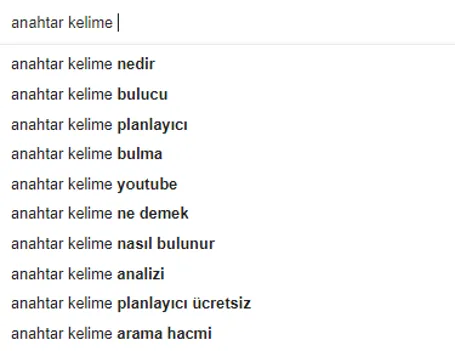
If you look at the intro of this post, you’ll spot some of these keywords, and of course that’s no coincidence. So is there any difference between long-tail keywords and the rest?
Technically, no. Both are groups of words that serve the same purpose. But long-tail keywords are more specific and less competitive. For example, the competition on Google for “content marketing” is much higher than for “how to build a content marketing strategy”. So to reach your own niche, you may need to lean on keywords like these.
The biggest advantage of long-tail keywords is that people searching for them are usually closer to buying. Someone searching for “blue running shoes size 41” is more likely to buy than someone searching for “running shoes”, because they’ve more or less decided what they want and moved past the awareness stage.
Around 70% of Google searches are long-tail keywords.
Step 1: Discover keywords
Before you start discovering keywords, it helps to brainstorm. Think about what you do and let your thoughts flow about what your customers might search for. You can even talk to your customers directly.
Say you make bins. Start thinking: what problems do you solve for your customers? What will people search for most? Maybe you need “odour-locking bin”. Maybe, instead of “lift-top bin”, you need keywords like “pedal bin” or “push-open bin”.
Once you’ve chosen these keywords, you can use keyword planners to see which ones get searched the most. A generic keyword like “bin” or “rubbish bin” might not help you much. As we said, generic keywords are very competitive.
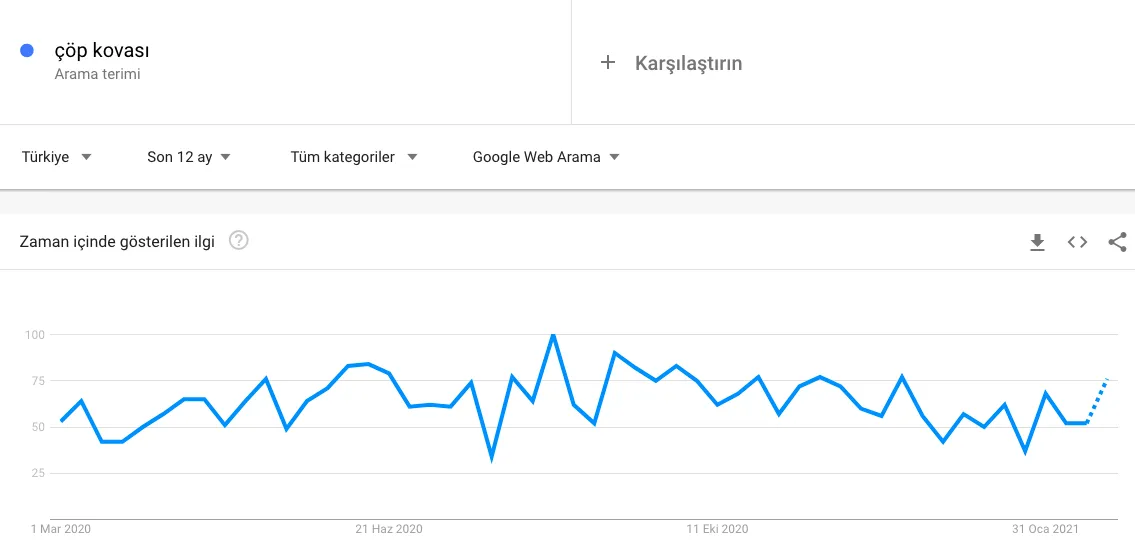
Above, I used Google Trends to look at search volume for “bin”. The chart shows how popular the search has been over time. Some keywords rise and fall seasonally, and Google Trends gives you useful insight here.
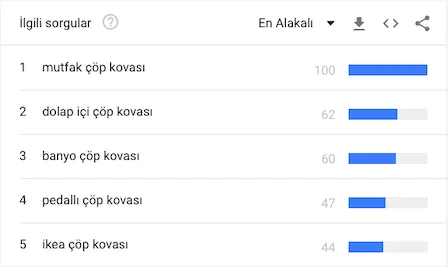
Above are some related searches Google suggests for “bin”. Based on these, you can dig deeper into the keywords and work them into your content strategy.
Step 2: Check search volume and competition with a keyword planner
Once you’ve brainstormed and done some quick searches, you can bring in tools. Keyword planners give you easier and more accurate results. Some are free, others are very expensive. Most work in a similar way and get their data in a similar way. With these tools you can see:
- Search volume for a keyword
- Competition
- Ad cost
Of course, the companies behind these tools offer extra features too.
Search volume on its own may not mean much. “Smartphone”, for example, has enormous volume, so 1,000 searches for “smartphone” doesn’t mean much. On the other hand, 100 searches for “management consulting services” could be critical for your business.
Each keyword also has a competition score, which shows how hard it is to rank with it. Here too, you can see which keywords are competitive without any tool, just by searching. Search “smartphone” and you’ll see big retailers. If you see news sites for a keyword, it’s probably a highly competitive one.
Paid tools can also show you how well each keyword converts.
Step 3: Use your keywords
Now that you’ve planned your keywords, you can use them. Make a spreadsheet, tick them off, and work them into your content marketing strategy.
Before you start writing long blog posts around them, think: what does the person searching this want? To buy a product? Or an answer to a question?
If you’re building a page for “how to choose a fridge”, it’s wise to greet the user with a blog post.
For “A-rated fridge”, you can greet them with a page where they can buy.
Search “New Balance” on Google and the first result will be New Balance’s official site. Search “New Balance black sweatshirt” and you’ll probably land on an e-commerce site.
The user’s intent changes with the keyword, and so does the page they expect to land on. Once you know the intent, your content will start taking shape in your head. Then you can spread the related keywords across your content strategy.
Some SEO experts suggest using one keyword per 100 words.
What are the best keyword planner tools?
There are many tools at different prices, so you may need to compare them to find the right one for you. It’s worth saying that the companies selling these tools are some of the biggest names in content marketing, so a lot of what you’ll read while researching them will be biased. So biased that each of them has content comparing itself to the others. To get a clearer picture, I strongly recommend using free trials to find the best one yourself, or asking people who’ve used them.

Some premium keyword planners:
- Semrush
- Ahrefs
- Moz Pro
- Growth App
- Serpstat
Free keyword planners and finders
- Ubersuggest
- Google Ads
- Keywordtool.io
- soovle.com
- Google Trends
Ubersuggest
Ubersuggest is one of the best free tools. You can see traffic and backlinks for your own site and your competitors’, and plan keywords. It also has a very handy interface. Click “Keyword Ideas” in the left menu to start planning keywords, and choose your language and location to tailor your searches.
If you’re trying to grow a small business or reach your audience with content and don’t have much budget, Ubersuggest is a great tool.
Google Ads
Google Ads Keyword Planner is a free planning tool that gives you a lot of detail. It’s simple to use, and you can plan the ad campaigns you’ll run on Google with it. Because it plugs straight into everything else in Google Ads, it makes the process much easier.
So how do you access Google Keyword Planner without running ads?
To create a Google Ads account, you first sign in with Google. Google asks you to create an ad campaign, but you don’t actually need one to reach the Keyword Planner.
- Scroll to the bottom of the page and click “Switch to Expert Mode”.
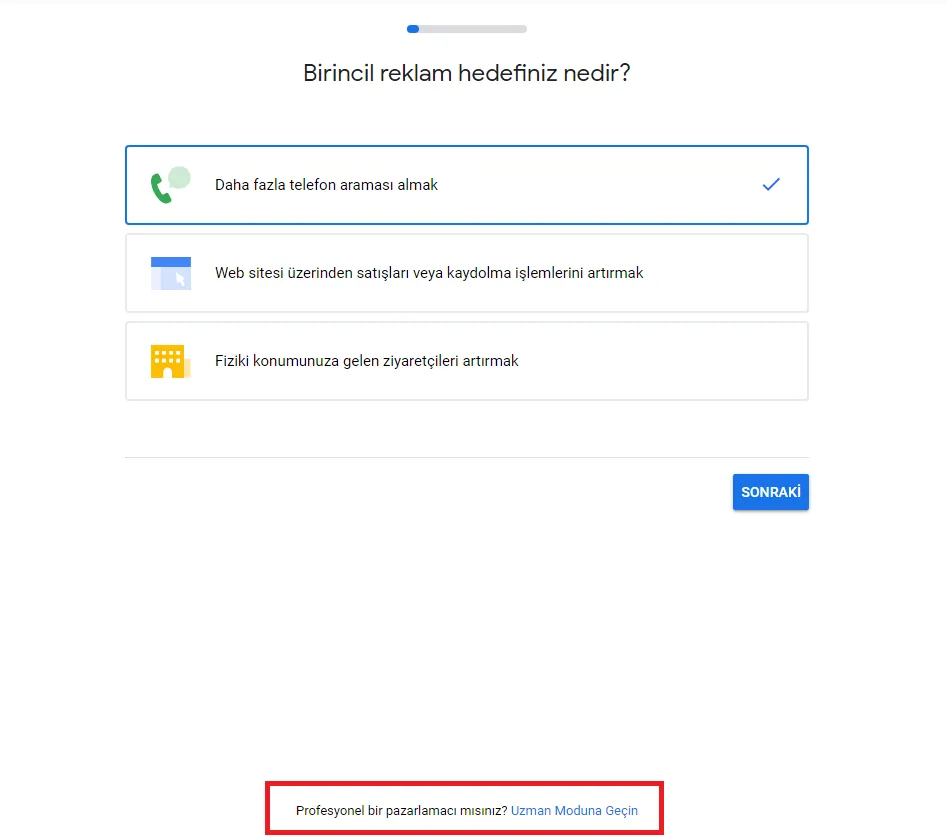
- Then choose “Create an account without a campaign”.
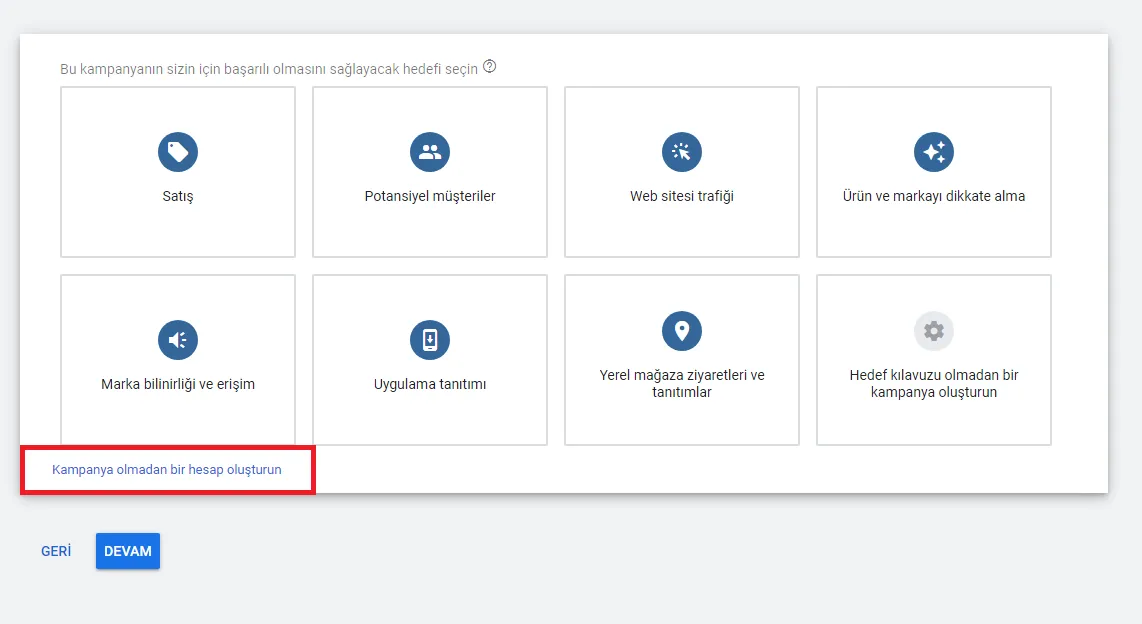
- Fill in the required details and submit. You now have access to Keyword Planner. Open the “Tools and Settings” menu at the top right of the page.
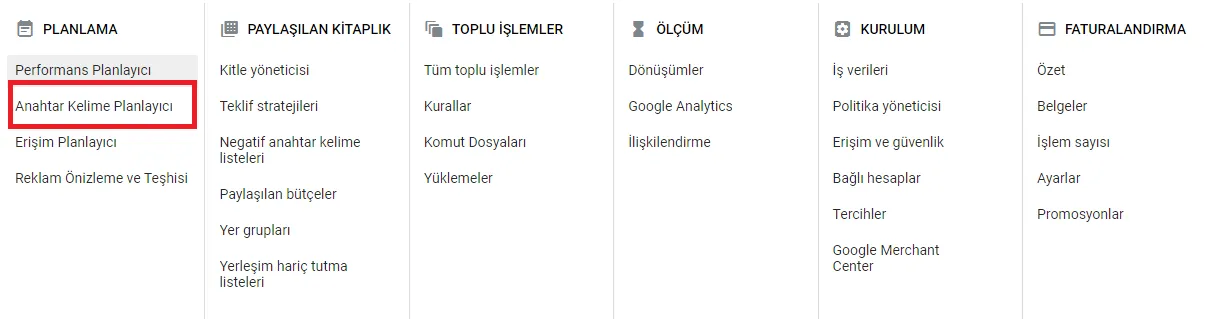
Select “Keyword Planner” and start generating ideas.
Keywordtool.io
This tool shows the most popular searches, but unfortunately it isn’t completely free. You need a Pro subscription to see more results. Its best feature is that you can see results from other search engines too, like Amazon, YouTube and the Play Store.
Soovle.com
As I mentioned at the start, soovle.com can be a great planner, at least for the brainstorming stage. It shows autocomplete results for your search from several major search engines at once, so you instantly see what comes up where and how they differ.
Google Trends
Google Trends is a very simple tool for spotting opportunities and seeing where searches are concentrated. You can also compare keywords and see which way trends are heading.
To sum up, keywords are critical to your content strategy. If you want to earn revenue from your website or grow sales by strengthening your SEO, it pays to understand how they work.
In this post I covered what keywords are and the key keyword planner tools.